
If you’re a new parent with friends in the know, they’ve probably raved about using a private photo-sharing app. Not only do they let you update all your favorite people in one shot, but they’re also the easiest way to save and store memories, track milestones, organize all your photos and videos, and even turn your favorite moments into printed photo books. Above all, they let you protect your kid’s digital footprint, away from public social media, and keep their images private. Two of the most popular options loved by families? Tinybeans and FamilyAlbum.
Both apps offer a secure space to store and share photos and videos with loved ones, let you make journal entries about daily life and baby’s development, and offer photo books that bring your digital memories to life. What are the differences between the two private photo-sharing apps? There are a few, and to save you the hassle of comparing Tinybeans and FamilyAlbum, we’ve broken down the pros and cons of each app so you can easily see which one is right for your family.
Everything you need to know about private photo-sharing apps FamilyAlbum and Tinybeans:
FamilyAlbum: Pros and Cons
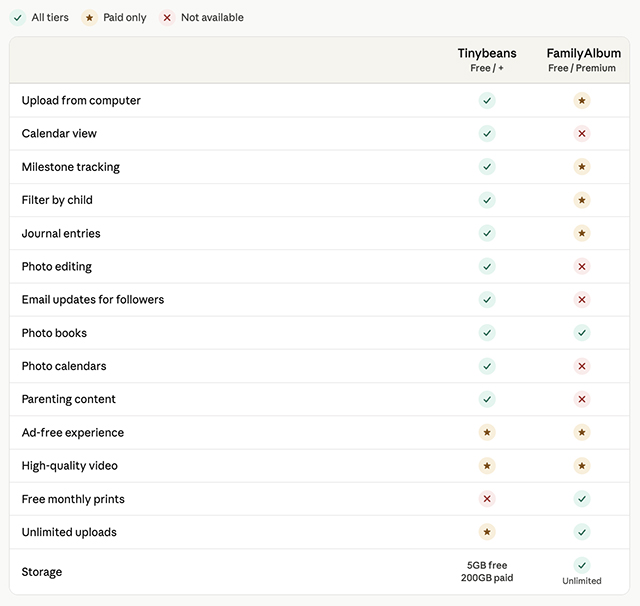
FamilyAlbum is a private photo-sharing app that allows unlimited photo and video storage, whether or not you upgrade to the premium version. You can register up to 100 people to be a part of your journal, allowing them to see your photos and journal entries. A unique feature is the 1-second movies that are sent every month and year. These automatic shorts are created with one-second clips made from your photos and videos, and are a feature included in both the free and premium memberships. There’s also the home widget that provides a rotating slideshow on your device’s home screen.
As a premium member ($5.99/month or $59/year), you gain the ability to upload longer videos (over two minutes), use your computer to upload images and videos, sort memories by child, and create monthly journal entries. You also get more 1s movies as a premium member and can choose who sees your photos and videos. Premium Plus members ($10.99/month or $109/year) also get higher-quality videos, bulk downloading, background uploading, TV casting, and can search memories and edit 1s videos.
FamilyAlbum photo book options, while varied in size and price, are suggested monthly using AI to select images. You can order them as they are presented, edit them, or create your own. If you have a premium subscription, they ship free of charge. FamilyAlbum also offers 11 free photo prints per month for all subscription tiers.
What doesn’t FamilyAlbum have? There is no milestone tracker or journal prompting, and customization is pretty limited, as it doesn’t offer any photo editing, stickers, or detailed prompts. As far as support for parents goes, FamilyAlbum doesn’t have any editorial articles.
Tinybeans: Pros and Cons
Tinybeans is more of a memory-keeping platform than just a photo-sharing app, offering a digital journaling experience with detailed prompts, doctor-approved milestones, weekly and monthly memory emails, advanced photo-editing capabilities, and quality parenting content ranging from parenting advice to activities for kids and family-favorite recipes.
Photos and videos can be uploaded, edited, and enhanced, then added to a journal that features Department of Health-approved developmental milestone tracking and thoughtful and in-depth prompts to encourage meaningful notes. Videos, photos, captions, and notes are displayed in one organized spot, and daily notifications remind parents to engage with the app, whether that’s noting baby’s latest development or jotting down a sweet memory to share with family.
You and family members who share your subscription receive personalized email recaps, and as a bonus feature for less tech-savvy relatives, you can comment on photos right in the email. You’ll also receive newsletters filled with parenting content, expert tips, trending topics, and shopping suggestions, all curated by a knowledgeable editorial team to support parents on their journey.
Tinybeans photo books come in a number of striking designs, with seasonal drops for holidays like Mother’s Day. You can select photos manually or by date range, or choose a photo book created from an auto-organized Smart Album around a time period or event. It also offers a more robust customization experience, as you can rearrange the photo books, edit the captions, and select backgrounds.
What are the downsides of Tinybeans? The free version only allows 20 uploads per month. However, as a premium Tinybeans+ member ($7.99/month or $74.99/year), you’re allowed unlimited monthly uploads, 200GB of storage for 50K+ photos and videos, high-quality videos, and the ability to share all subscription benefits with another person.
What about privacy and family safety?
If you’re considering a private photo-sharing app, then having a secure way to share with your family is important. FamilyAlbum and Tinybeans both offer private, invite-only sharing and strong encryption to keep users safe, and both allow users to retain ownership of their content. Any photos or videos you delete from the apps are deleted from their servers, which are firewall-protected, and both have two-factor authentication and SSH key access.
Which private photo-sharing app is right for your family?
If you’re all about keeping track of your photos and videos and aren’t interested in tracking milestones or journaling about your child’s journey, FamilyAlbum is probably the best app for you. It gives you the storage you need, some prompting to upload, the ability to make photo albums, and to share with family.
If you’re looking for a complete memory-keeping space that allows you to digitize memories that often fall by the wayside (like those adorably cute toddler mispronunciations), edit your images in the app, receive reminder notifications, get monthly emails that relatives can comment on (perfect for grandparents who aren’t tech savvy), print more than just photo books (think calendars and mugs), and enjoy reading age-appropriate parenting content, then Tinybeans is the app for you.